Unity 2D Game 3: Block Destroyer
My journey through 2D game development using the Unity engine continued with our third project: a clone of Brick Breaker or Arkanoid. In case you’ve never seen it before, this is Arkanoid:
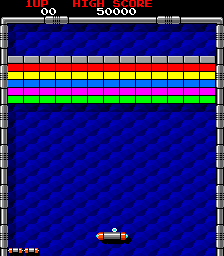 Arkanoid
It’s got a pretty important legacy, Breakout, the version that Atari created, was an important stepping stone for the two Steves of Apple (Steve Jobs and Steve Wozniak).
So it makes sense that this would be one of the games we would use on our learning journey. This is what my first level looks like:
Discovering new git GUIs
When I wrote about checking out KDevelop, I mentioned that it was due to a blog post by the Kate developers about how to evolve Kate going forward. Last night I came across a new article in the same vein in which they looked at potential git GUIs to use from within Kate. In my KDevelop post, I mentioned that I use QGit, but it can look a bit small in the screenshot of my 3 monitor desktop. So this is my typical QGit setup:
Learning how to make 2D Games in Unity
I’ve been playing video games since I was somewhere around 5 or 6 years old and got a Nintendo Entertainment System for my birthday from one of my aunts. I also inherited a Tandy computer from my dad when I was younger. We had a bunch of edutainment games - like this Sesame Street game (that unfortunately a quick search on Google Images does not turn up) where you had to suck the Tweedles (bugs from Ernie’s flower box) to solve math problems. I also, and I’ve mentioned this before in several places on the net, learned to program from a book on BASIC and made myself a bunch of simple games, including Madlibs clones.
New Release (v1.9.3) of my Extra Life Donation Tracker Software
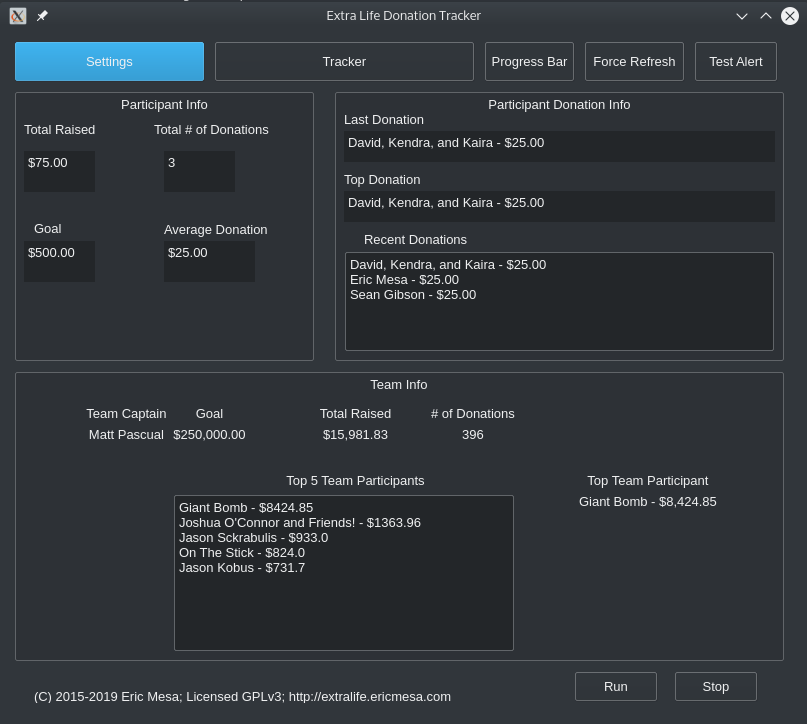
I’m getting really close to finally getting this program to where I wanted it to be 4 years ago. My most recent release adds in the Team info to the GUI (and the previous release, which I didn’t blog about added team info in general). I’m getting feature requests and bug reports and all those kinds of encouraging things that make people want to provide programs for others. Also new as of a couple releases ago is the fact that I’m using Github’s CI (called Github Actions) to produce binaries for me that I can attach to releases to make it easier for folks to use the software.
BBQ Thermostat Project
I recently started an electronics hacking project to build a thermostat for my Weber Smokey Mountain. You can find details at Hackaday.io, but if you’ve been here long enough you know that I don’t trust other sites to continue to exist. (It’s why I copy my book reviews over from Good Reads). As of right now I’ve got the board able to read temperatures from a thermocouple that I send, via WiFi, to an MQTT broker. Then, via Python I take subscribe to that MQTT topic and put it into InfluxDB. From there I use Grafana to graph it. Here’s an early beta where I was trying to make sure it was working from end-to-end:
My First Pull Request to a project I don't own!
When MakeMKV added a new requirement for ccextractor, allowing it to grab subtitles that are encoded on the DVD or Blueray as Closed Captioning instead of subtitles, there wasn’t a package available for Fedora. (There is now, but at the time where wasn’t) So I wanted to make an RPM that I could host on Fedora’s COPR for others who needed the package. There was a problem with their shell script for building RPMs. At the time I just kept hacking away at it until I was able to build RPMs. But I didn’t think about how the manual process wouldn’t be sustainable as changes were made to CC Extractor. They weren’t having releases too often, so I didn’t worry about it. But then they made a new release and I knew that this time, having leveled up on my git-fu, I would try and figure out how to fix that problem and submit a pull request.
Addendum to my KDevelop Post
A couple days ago, I wrote about giving KDevelop another look and posted it to reddit’s r/kde. In my post, I’d said it was annoying to have to configure the color schemas per file. Someone commented on the subreddit that if you use the View->Schema menus it’s per file while if you go into Settings->KDevelop settings you can change it for all files.
As a side effect I explored the same options in Kate and set it up like this:
Moving to KDevelop for my larger Python Projects
When I first started programming it was just at the prompt of my Tandy computer. Then it was in the QBasic text editor on the IBM computers at school. But when I started programming again with “real” languages, I ended up going with Emacs. Although I was first annoyed at the way commands like save were prefixed, it became my favorite editor. I think that was partially because of diving headfirst into the free software movement and partially because I didn’t like vi’s different modes and how annoying that made things if you didn’t realize you weren’t in the text entry mode. Eventually, I moved on to Kate because I love KDE (been running it as my main desktop for over 10 years now) and I loved the features it enabled. Also, since vi (or vim) is found EVERYWHERE while Emacs usually requires installation, I ended up switching to vi whenever I’m ssh’d into a computer. If you add plugins like powerline, it can be pretty awesome to use. Even on my desktop if I’m editing /etc/fstab I’m more likely to pull up vi than the weight of KDE (not that it takes up THAT much RAM).
New Release of my Extra Life Donations Tracker Software
After a bit more work since my 21 July post, I’ve finally reached what I can consider to be beta status for the GUI. Things have matured to the point where it works well on both Linux and Windows and I’m now using it every time I game. I created a bunch of issues on Github to track new features I want to add in order to get to what I think will be a 1.0 release. I’m excited at the progress I’ve made and that the software continues to have interest. As always, the code is available on Github. Here are videos on how to use the GUI:
New Release of my Extra Life Donations Tracker Software
If you follow the blog, you remember I’ve been working on a GUI for the donation tracker. Part of making that work involved changing the code to be object oriented. Also, it required moving the user-defined configs to be moved out of the main code. I’ve done that and finally tested that it works (I had a silly bug involving a typo that I had to correct) and merged the code into master over on the github repo. The new code required a change in the directions, so I made new instructional videos to go along with those changes: