What I've been up to in Programming: Python
Selenium for Automated Pool Signup
Spent the last week debugging that script. Turns out the key to getting it to run in cron is to add export DISPLAY=:0 && before your command. That’s because Chrome will not launch without a display to send Chrome to.
Python Morsels
The most recent Python Morsels exercise was to figure out if a number was a perfect square. Trey began his problem statement this way: “This week I want you to write a function that might seem simple at first, but there’s a number of ways to solve it.” It definitely took some out of the box thinking for me to figure out how I was going to solve the base case. The math.sqrt() function returns a float so that it can give answers for non-perfect squares. So I kept thinking and I realized that any perfect, non-complex square root must be an integer. So I came up with the conditional to return. (And after all this Pythonic learning, I’ve learned not to evaluate for truth and then return a variable. Just return the evaluation)
Last Few Days in Programming: Lots of Python
Been quite busy with Python, keeping me away from other pursuits, like video games. (Although the kids have been requesting Spelunky 2 whenever it’s time to hang out with them)
Extra Life Donation Tracker (eldonationtracker)
For my Extra Life Donation Tracker I pushed out a new release, v5.2.2. A user of my program (man, I never get tired of how awesome that is!!) had wholly anonymous donors which was causing an issue I thought I’d handled. But it turns out that the folks that run the Donor Drive API are a little inconsistent in how they handle that in the donor endpoint vs the donations endpoint. So I pushed that fix out and now things should be dandy for game day (about 2 weeks away!!)
Last few weeks in Programming: Python, Ruby
You may notice it’s been a while since I last wrote about programming. Well, a lot of the programming I was doing with the kids was due to having more time on my hands thanks to COVID. With Scarlett back in school full-time, there’s a lot less time for that as we focus on making sure she gets the most out of her education as well as teaching the twins to make up for not being in preschool this year. This has left me with reduced time for all my projects and entertainment (games, TV, and reading). Up until now that has meant the programming was put off to the side - kind of. Because I’ve been loving my exercises from the Python Morsels website and I’ll be talking about that when I get to the Python section. But first up, Ruby!
Last Week or So of Programming: Python, CircuitPython, Scratch, Arduino, and MakeCode
Because I’ve been busy with programming and other tasks (including getting re-addicted to Cities: Skylines), I’ve got a roundup from about the last week or so in programming.
Python
Python Morsels
I got the mid-tier of the Pycharm Humble Bundle which came with a bit of a subscription to Python Morsels. Every week Trey Hunner, a Python trainer, sends subscribers a problem to solve along with a few bonus questions to deepen the learning. Here’s what I’ve loved so far:
Last Few Days in Programming: Python and Arduino
Python
Spent the last few days finalizing the 5.0 release of my Extra Life Donation Tracker and then pushed ahead to get version 5.1 out. Here’s the PyPi page if you want to use it for your Extra Life live streams.
Arduino
I got back to my BBQ Themostat project and did some minor programming while trying to figure out how to run a computer case fan. So far I’m still working on the wiring aspect of this part of the project, but some folks on reddit did point out that part of my problem was getting a pair of my BJT connections mixed up.
Today in Programming: Microsoft MakeCode
With the twins, I messed around with a Neopixel strip. Not sure what I’d do with one in a future project, but at least I know how to program it in MakeCode now. Our project:
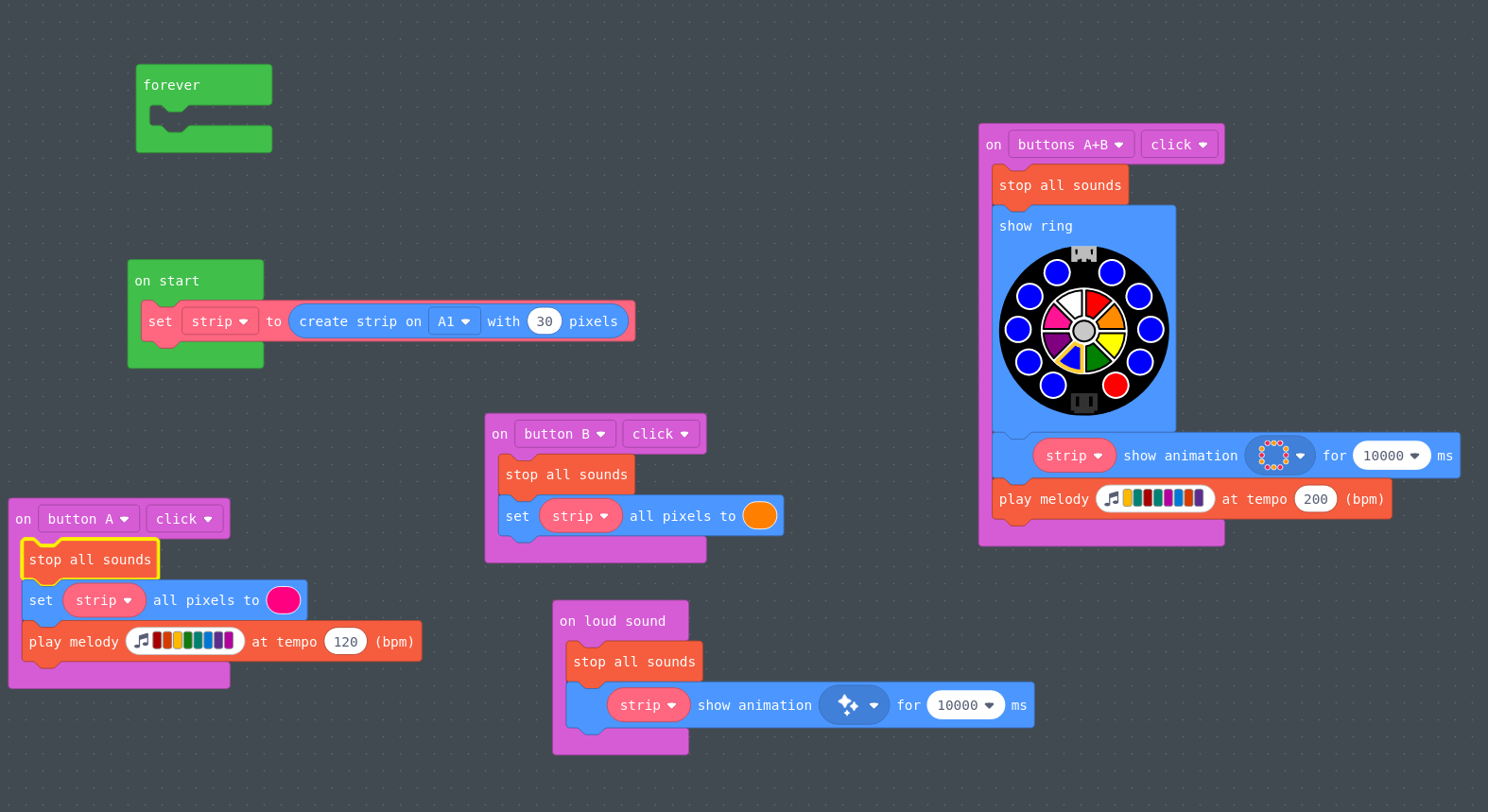 Messing around with the Neopixels Strip
Today in Programming: Microsoft MakeCode
Since I’ve been making a lot of great progress programming with the kids in Scratch, I bought some Circuit Playground Expresses to program with the kids. The Circuit Playground Express can program in Arduino’s C dialect, CircuitPython, or Microsoft MakeCode, which uses blocks like Scratch. Today Scarlett and I made our first useful bit of code, a digital spinner we called The Sibling Chooser. Here’s the code, and you can see that it is indeed like Scratch:
Today in Programming: Python
I noticed that something had gone screwy with the Raspberry Pi 1B in the garage that was monitoring the garage door. I restarted it and discovered that last time I was coding and working on making it more robust if it had a temporary lapse in WiFi (so it wouldn’t crash), I’d created a little error. Fixing that error led me to realize that my new code for robustness had introduced an unfortunate artifact in that it would pass a status of “unchanged” to MQTT. So I fixed that. Code’s now in a good place. I just need to add a few more config options to make it more usable for others who aren’t me. Then I’ll make another release.
Raspberry Pi Zero W for new Projects
The next project I wanted to work on was to see if maybe my environment monitoring might be slightly more reliable with a Raspberry Pi than with an Arduino. So I wanted to do some comparisons. For my bathroom IoT project, I am using:
- Arduinio MKR Wif i 1010 - $32.10
- Arduino MKR ENV Shield - $34.40
- 5V 2.5A power supply - $7.50
That’s a total of $74 before taxes and shipping. To get the same measurements on the Pi platform I went with:
Yesterday and Today's Programming: Scratch
Stella’s Project
Because last week was busy with house projects, this week I continued the ocean/water-themed programming from the Raspberry Pi Foundation. The first project was a game I made with Stella (her first computer game creation), a boat race in Scratch. While we mostly stuck to the tutorial, we did partake in the challenges, including adding a shark and figuring how to have background music (which Stella chose on her own). That turned out to be really tough as my attempts to figure out how to use the loops led to stuttering. Eventually I figured it out and you can see what I did, the rest of the code, and how the game plays by watching the video below: