My Extra Life Donation Tracker gets a GUI Part 1
Three years ago I created ELDonationTracker to use the Extra Life API to provide donation alerts on my screen while I’m streaming or recording games. About a year and a half ago, I actually had to start using it because the previous donation tracker I’d been using stopped being maintained. Since then I’ve been steadily improving it, but there’s still a bit of functionality for the alerts when someone donates that I was missing by running a commandline utility. A year ago I tried creating a GUI with Tkinter, but I just found it too hard to figure out. What I really wanted anyway was to do it in QT or QML. A few months ago I saw that it appeared the company being QT was going to finally take Python seriously. While looking up some tutorials on PyQT I found out that I could use QT Designer to do a WYSIWYG design and then a simple utility to convert it to Python code. Since designing GUIs is a real drag and takes away time from doing the coding to make the GUI work, I was jazzed. So I threw this together over a couple days, copying the interface from the program that was no longer maintained:
Creating Nice-Looking Buttons in QML on KDE
Back in October I created a GUI for my Python amortization table program. One of the things I lamented was that the buttons in QML look like crap. I want my buttons to look like buttons, not blue patches no a white screen. I don’t really know what made me look, but yesterday (during the No Snow Snow Day) I was looking through the file system and it turned out I had Plasma Components installed on my system. So I added
My Second Ever Useful GUI Program
A while ago I wrote about my first ever useful GUI program. And in one of the series of posts that followed I explained that the reason I hadn’t made a useful GUI program before now is because all the typical stuff has already been made over and over. We don’t need any more tetris clones, word processors, or music programs. Recently I had reason to create my second program. A while ago I created a an amortization calculator in python which you can find here.
Developing My First Plasmoid: The QML Code
Back in February I posted the code to the data engine I developed for my plastmoid. At the time I’d wanted to clean up my plasmoid before posting it on here, however, I’ve become stuck on a key feature so I was hoping that maybe by posting the code I could get some help. (As well as provide an example to others)
First of all, plasmoids need a certain structure to the folders. Here’s what mine looks like:
. ??? contents ? ??? ui ? ??? Button.qml ? ??? Button.qml~ ? ??? content ? ? ??? ItemDelegate.qml ? ? ??? ItemDelegate.qml~ ? ??? flickrhelpers ? ? ??? addtogroup.py ? ? ??? addtogroup.py~ ? ? ??? removefromgroup.py ? ? ??? removefromgroup.py~ ? ??? flickrviews.py~ ? ??? flickrviews.qml ? ??? flickrviews.qml~ ? ??? test.qml~ ??? metadata.desktop ??? metadata.desktop~
Developing my first plasmoid: The Data Engine (in python)
I figured it’d be neat to show you how my plasmoid works so you could use it when developing your own plasmoids. Here’s the main.py of my data engine. The indentation is off, in case you try to copy and past this in.
Here are the imports:
from PyQt4.QtCore import * from PyKDE4.kdecore import * from PyKDE4 import plasmascript #for flickr import views
Those are pretty standard. The last one is the part of my engine that interacts with flickr. Right now I have some work to do to get that presentable, but all you need to know is that it outputs XML to this main part of the data engine.
Developing my first plasmoid part 3
I did it! I have created my first ever useful GUI program. After all these years of thinking that all the useful GUIs had already been invented - I found an itch to scratch. And here’s how the final, working version looks:
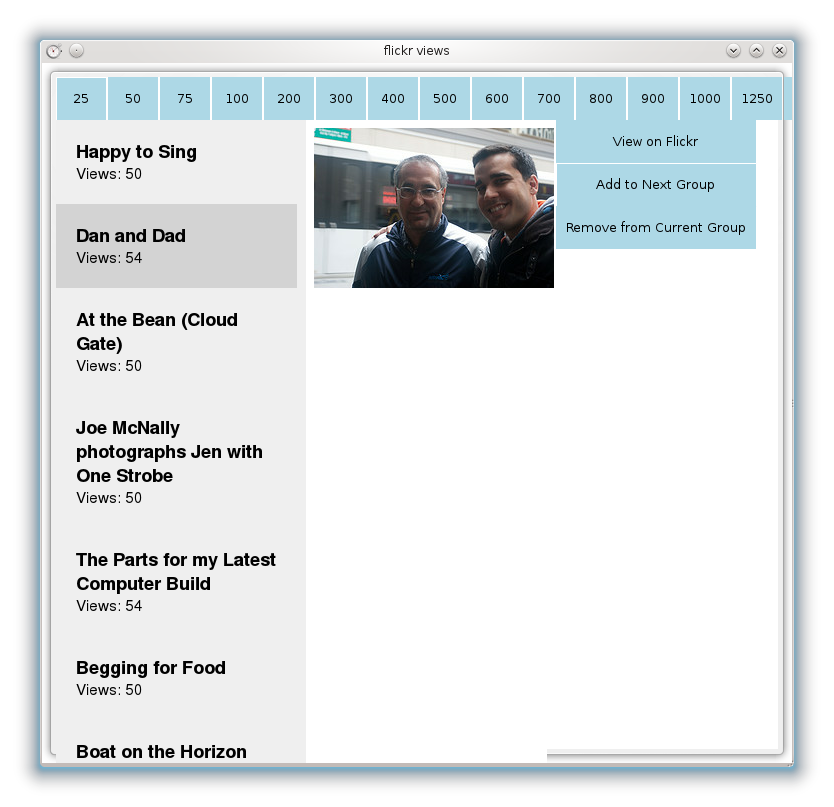
flickr views plasmoid completed!
And so there it is! I was actually surprised that this last little bit of the program wasn’t as hard to finish up as I thought it would be. So, as currently implemented, when the plasmoid loads up it makes the data engine fill itself. Once that’s complete you can click on the buttons along the top to load up all the photos from that group that are ready to be promoted to the next group. Clicking on a particular photo loads up the small thumbnail. View on flickr allows you to jump to the website in case you want or need to do that. Originally I implemented it so that if the next part was hard, I’d at least have the functionality of the command line version of this software. Then came the new part that happens to be easier in a GUI than on the commandline. You can add the photo to the next group and remove it from the current one. The reason I did it that way was so that if the photo couldn’t be added to the next group, it wouldn’t be removed from the current one. I tested it first with a fake group and then the real thing and it works fine. Before I post the code for my data engine and plasmoid, I have some cleaning up to do. I also need to add in a bit more functionality for robustness. After that, if I’m going to make it so that anyone can use it (and post it on kde-look.org), I will need to do some extra work. So that’s version 0.1. For version 0.2 here’s what I’d have on my TODO list:
Developing my first plamoid Part 2
OK, so it’s been a year since I last blogged about working on this program. I tried working on the data engine in August and then got stuck right around the time I started my first semester of grad school so I had to drop it, even though it got stuck in my head and I was thinking about it for weeks until the light bulb went off. I wrote my idea and just had the idea to work on it recently. I have to say that, overall, QML is pretty awesome for making a quick GUI. I’ve always struggled with GUI code, but with QML I was able to put together a quick GUI in about 20 minutes. Now, don’t judge QML too harshly because my plasmoid looks ugly. It looks ugly because I just put together the minimum GUI to implement grabbing data from my Data Engine. Once I get everything working right, I’ll fix it up. After all, GUIs are really so easy in QML that it can be the icing on the cake in the end.
Developing my first plasmoid Part 1
I have three main hobbies: photography, my webcomic and programming. After spending a year working on my 365 Project, I’ve been taking a lot less photos as that part of my brain takes a break. After working with Dan to get the story for INM worked out through May of this year and working on strips that will appear this March, I wanted to take a bit of a break from that. The one bit of code I wrote for myself that I use on a daily basis is my flickr views code.
Programming to the Rescue: Amortization Automation
What I love about programming is the instant feedback. In most programming languages, after you set up a framework for the barest bones of a program you can then run it at every step of the way to confirm that you are moving towards your goal. What I love second-most about programming is the fact that I am using my computer to solve a problem and free myself from tedium.
365 Graph
Today I worked on a python program to create a graph of the views of all my photos in my 365 Project set. Here’s the result: (click for full size)
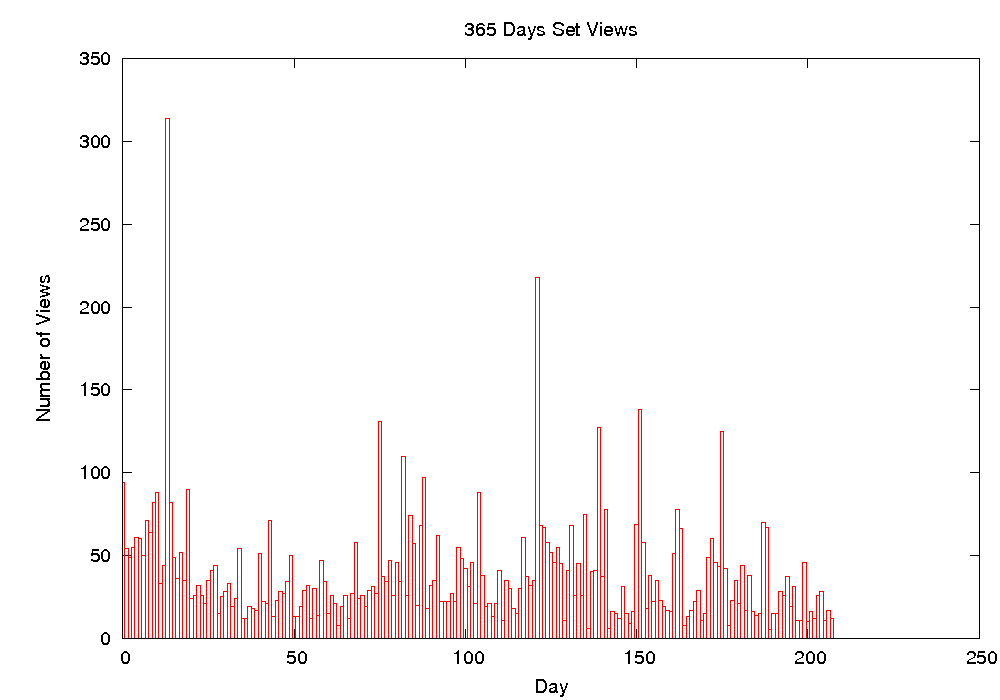
365 Project Views Graph
I was curious how they stacked up and I wanted to see if I could detect any patterns. Except for a few outliers, they’re mostly below 50 views per photo. I also expected to see more views after I started adding my photos to more 365 photo groups, but this is not the case. There do appear to be clusters of views. In other words, one highly viewed photo seemed to lift the ones by it. That one huge outlier is my photo making fun of causes of the swine flu. The other big one is my Heroin Chic photo, no surprises there. It was fun to create this and I learned a new python module. Also, even though it probably took me a bit more time to program than to do it manually, it will now automatically generate whenever I want, and that’s worth the time it took.