One last, good look at KDE 3 Part 1
As you can see, by trawling through this, I have gone back and forth between KDE and Gnome a lot. As I’ve mentioned many times before, I initially loved KDE over Gnome. It looked more like Windows, it had more neat options, and great programs. Not only is Amarok the best media player out there (although Rhythmbox is not far behind), but the KDE programs feel so much more tightly integrated than Gnome. That’s one part where they’ve always had a huge lead over Gnome, although Gnome has been catching up recently. Still, I hope that KDE continues to evolve its KParts and KIOSlaves infrastructures. (Or whatever they evolve into in KDE4) KDE programs also just seemed to fit together visually so much better, I don’t know why because Gnome has the HIG.
Awesome? Or Too Much Time on His/Her Hands?
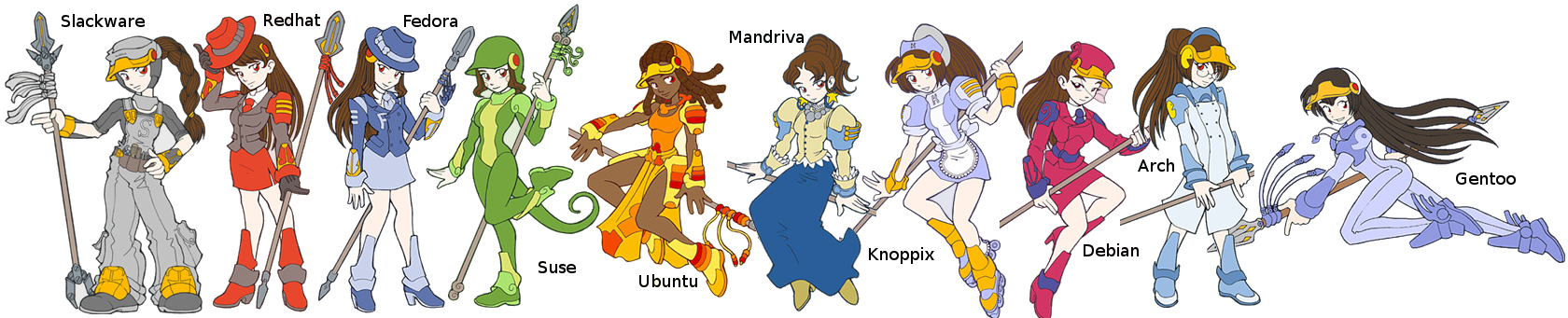
Someone decided to represent all of the Linux Distributions as Anime girls. What do you think? Does it represent the attitude of your favorite distro?
The Ego-less Desktop vs The Commercial Desktop
In the most recent LugRadio episode was a feature about how the Gnome Human Interface Guidelines (HIG) states that applications should be named in the applications menu not as the program name, but as what the program does. This is something I’d like to explore a little more in another post. But during the discussions, they mentioned an interesting point: Gnome follows (or tries to follow) the paradigm of the ego-less desktop. This means that it’s not important who coded your program, it’s important what it does. And this got me thinking about one of the HUGE annoyances I have as I read the blogs and news pages about Linux. Everyone complains about how Linux isn’t quite there yet and how it needs to fix this or that before it’s easy enough for the proverbial Grandmother. Let’s take a look at some use casse and see how Linux is precisely the opposite - it’s MUCH easier to use than Windows.
New Distro Releases Coming up THIS MONTH!
Two major Linux distributions will be making releases this month and since I use both of them, I’m pretty excited! First up will be the Debian-derived Ubuntu. This distro has been the darling of users and Internet media alike for the past few years. It stole the post from Mandriva, the previous Linux distro that everyone recommended to new users. Although Mandriva was the easiest distro for new users, it also had a reputation for being so bleeding edge it was unstable. Ubuntu, however, is very stable and tends to work on more hardware out of the “box”. In fact, it was Ubuntu’s ability to work on laptops, long the Holy Grail of Linux distros, that led it to such prominence. That is the main reason why I chose to install Ubuntu onto my laptop even though I’ve been a Fedora user since I first got into Linux about five years ago. Ubuntu 4.08 aka Hardy Heron will be flapping its way to you on 24 April.
IceWM
After a light window manager roundup in the latest LXF (Issue #103) I decided to give IceWM another shot. I had looked at it once before and found it to both be bare and lacking any programs in the IceWM->Programs menu. It loaded up ridiculously fast, which was nice. Unfortunately, for some strange reason, loading up Rythmbox also loads up the Gnome background. I understand that the Gnome libraries are loaded for whatever necessary reasons when Rhythmbox loads up, but I think it’s pretty rotten behavior to usurp the desktop background! I wonder if this is worth filing a bug report about with Gnome developers.
The future of Compiz-Fusion
Compiz-Fusion, as you surely know is responsible for eye candy on GNU/Linux distros such as windows that turn into paper airplanes when the user minimizes it to turning the desktop into a spinning cube. There’s something about the wobbly windows that provides some a sense of inertia that just makes things feel a little more dynamic on the desktop. I can’t explain it, but some of the effects make the GUI slightly more useful. However, Compiz-Fusion isn’t perfect.
KDE 4 is out!
KDE 4.0 was released today! After seeing screenshots like the ones I want to share with you, I can’t wait to try it. Too bad Fedora won’t be including it until Fedora 9 in April.
All of the following images were produced by/for KDE.org. I’m just borrowing them for illustrative purposes.
First of all, here’s the default GUI:
 Not too shabby. Looks pretty similar to KDE3, but with a “Vista Black” thing going on. But here’s where I really got excited:
iPod Shuffle
For years I had been saying that I would not buy an iPod product. After all, they sell music in the iTunes music store with DRM on it. All of my music on my Linux computer is in the OGG format and it can’t be played with iPods. However, when it came time to buy an audio player I did a bit of research. It had to be something I could buy at the local Best Buy because I had a coupon and gift card. Of the players sold at Best Buy, the players which supported OGG were, ironically, not well supported on Linux. In fact, the best supported and integrated player in Linux was the iPod. That’s important to me since I use my Linux computer for serving my main audio needs. All of my podcasts come in through Rhythmbox. The second requirement I had is that it had to be of the same form factor as the 2nd Generation iPod Shuffle so that it could use it at the gym clipped onto my shirt or shorts and not weigh me down at all. I used to work out with an iPaq in my pocket and it was not very comfortable at all.
Compiling
Recently I wanted to install VMWare on Danielle’s computer. I’ve installed Kubuntu on her Linux machine (Toad) and I wanted to get a clone over her Windows computer onto there in VMWare player. I used VMWare Converter to create the VMWare clone of her Windows computer and then put it into the Kubuntu box. But then there was a bit of a problem: the Ubuntu repositories did not have VMWare Player. I went to VMWare’s site and they only had rpms and the source code. I was hesitant to compile VMWare Player from source. I was sure it would be a monstrous mess. After all, I’d had problems with much less complicated programs.
Getting Compiz Fusion to Work Well
In order to get my title bars back, all I had to do was run compiz-fusion in the terminal. To get it to persist I had to do SYSTEM–>Preferences–>Personal–>Sessions. Click on add, name it whatever and the command should be compiz-manager and to get all the awesome plugins you’ve been seeing since the merge with Beryl, just download ccsm. If you have any problems, check out this linuxquestions.org forum, that’s how I figured it out.