Fedora Unleashed: My 2003 Gateway into Linux
I was happy to be interviewed for Fedora Magazine about How [I] Fedora and I mentioned that there was a Fedora book that led me to pick Fedora. ( I also mentioned that on this blog here) Recently I’ve been cleaning up my bookshelves as I have run out of space for physical books. While I’ve mostly gone digital, Goodread’s Advanced Reading Copies are currently only distributed as physical books and sometimes it’s nice to have printed deluxe copies of comics. I decided it was probably time to get rid of this incredibly heavy book (that’s moved 3 times with me), but before doing so I’d document some of the contents for historical purposes. What follows are some of the pages I had bookmarked or highlighted.
An appeal for keeping KDE Activities
As KDE 5 reaches 5.2 and many begin to debate its features (this is a small evolution on 4 compared to the difference between 3 and 4) there has been an ever-increasing assertion that Activities are pointless. (At least it appears that way to me) I wanted to share how I use Activities, why they make me more productive, and why they’re the biggest feature keeping me on KDE.
So, I have lots of Activities: Main, Media, School, Photography, Video Games, Video Editing, Programming, and Reading. In its current implementation, each Activity must have the same number of virtual desktops; three in my case. In each activity I make use of different widgets. On nearly all of them are the brilliant folder view and application launcher widgets. These allow me to quickly see the folders relevant to the task at hand. In the case of the Multimedia activity, desktop 1, this is very useful for my workflow. Let’s look at that desktop:
Updated to KDE 5
On the guest computer I updated to Kubuntu Vivid Alpha so I could check out KDE 5. Looks awesome - lots of polish over KDE 4. Sad that I’ll lose my current settings, but a chance to recreate with a new desktop.
btrfs needs autodefrag set
When I first installed my new hard drive with btrfs I was happy with how fast things were running because the hard drive was a SATA3 and the old one was SATA2. But recently two things were bugging the heck out of me - using either Chrome or Firefox was painfully slow. It wasn’t worth browsing the web on my Linux computer. Also, Amarok was running horribly - taking forever to go from song to song.
Upgrading SuperMario to Fedora 21
The latest curl works with XBMC (now Kodi) so it’s time to upgrade my main Fedora computer.
fedup --network 21 --product=nonproductSo that started running at 1427. The d/l finishes at 1500, but as usual some stuff to take care of. Mostly packages left over from previous versions of Fedora.
WARNING: problems were encountered during transaction test:
 broken dependencies
 kmod-nvidia-3.17.7-200.fc20.x86_64-1:331.113-1.fc20.x86_64 requires kernel-3.17.7-200.fc20.x86_64, kernel-3.17.4-200.fc20.x86_64, kernel-3.17.3-200.fc20.x86_64
 kmod-nvidia-3.17.3-200.fc20.x86_64-1:331.104-1.fc20.x86_64 requires kernel-3.17.7-200.fc20.x86_64, kernel-3.17.4-200.fc20.x86_64, kernel-3.17.3-200.fc20.x86_64
 nautilus-actions-3.2.2-4.fc20.x86_64 requires libgtop2-2.28.5-1.fc20.x86_64
 xorg-x11-drv-r128-6.9.2-1.fc20.x86_64 requires xorg-x11-server-Xorg-1.14.4-13.fc20.x86_64
 directfb-1.6.2-3.fc19.x86_64 requires libmng-1.0.10-12.fc20.x86_64
 kmod-nvidia-3.17.4-200.fc20.x86_64-1:331.113-1.fc20.x86_64 requires kernel-3.17.7-200.fc20.x86_64, kernel-3.17.4-200.fc20.x86_64, kernel-3.17.3-200.fc20.x86_64
 libipoddevice-0.5.3-8.fc12.x86_64 requires libgtop2-2.28.5-1.fc20.x86_64
 libbtctl-0.11.1-13.fc19.x86_64 requires openobex-1.5-9.fc20.x86_64
Continue with the upgrade at your own risk.
Time to sort that out. I also remove some of the really old stuff, stuff it lists as not having an upgrade - that I’ve had in there since Fedora 13 or so. In the end I’m left with the usual issue I have: my kmod-nvidia packages are tied to the Fedora 20 kernels. So, as usual, I’ll probably have to remove them and reinstall when I finish the upgrade.
Upgrading Kuribo
Upgraded my netbook, Kuribo, to Fedora 21.
fedup --network 21 --product=nonproductWent off without a hitch. Like the new login theme. Waiting to make sure the curl in F21 works with Kodi (formerly XBMC) since the current newest version in 20 doesn’t work.
Fedora 21 Beta KDE Spin Part 2
It’s a week and a half after the last time I looked at the Fedora 21 and about 2 weeks away from the final release if there aren’t any showstopping bugs. I just did an update and it appears that Fedora 21 will start out with KDE 4.x instead of KDE 5. I spoke to someone in IRC and it appears that KDE 5 is in no state to be included in Fedora. That’s fine with me. It appears we have learned from the KDE 4 fiasco. I’m OK getting KDE 5 later on in Fedora 21’s life or even Fedora 22. After all, if you really want it, there are ways to get it like COPR repositories or self-compilation. Fedora 22’s less than a year away, anyway.
LEGO vs Playmobil
I know I’m late to coming across this, but I found a presentation where someone was explaining the idea behind Fedora.next where there are 3 core products: Fedora Server, Fedora Workstation, and Fedora Cloud. But I also think it works rather well if you think of Gnu/Linux distros as LEGO sets and Windows/OSX as Playmobil. (Also, I’m now at the point in my life where I realize the benefits of each system, although I still think people should have the right to explore code they run)
Fedora 21 Beta KDE Spin Part 1
Booted it up in Virt-manager (which finally has bridging!) I love the new theme!
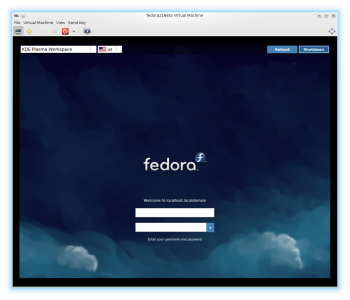
But, sadly, it logs into KDE4, not KDE5. Perhaps 5 isn’t ready for primetime?
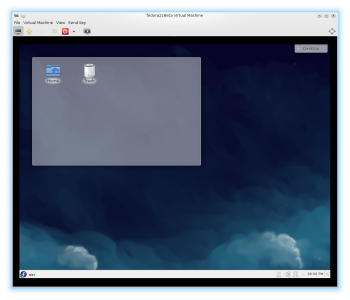
What I find baffling, given that this is running in a VM is that it loads FASTER to the desktop than the computer it’s running on. I wish I knew which technologies I am running or which widgets are causing my KDE load to go so slowly.