Thoughts About My First AI-Generated Project
EricMesa
- 8 minutes read - 1492 wordsUp until last week I had only ever used AI to find bugs, migrate dependencies, or implement small features in projects I had already spent years coding up on my own. Last weekend that changed when I asked an AI to develop a web app for me. I have a 3D printer and, sometimes when it notifies me the print is completed, I will go to retrieve my print only to find a mess of spaghetti and wasted filament. The 3D printer company sells a specialized camera that works with their printer, but I didn’t want to spend $35+ when I already have an old, unused webcam sitting unused in a drawer. I wanted to be able to pull up a website choose to record a video or a set of images on a timelapse. Once I started the print I wanted to be able to go on to that same site and see a live feed or, if I set it to a timelapse, I wanted to be able to see the last frame captured. I have no idea how to do any of that. On top of that I have a dozen other projects that I wanted to work on. So I thought I would give this AI-developed (vibe coding?) workflow a try.
I’ve mentioned before that I don’t pay for any of the commercial AIs. I have a local install of qwen-coder that I’ve hooked up to nvim and VS Code and I use whatever Cursor, JetBrains, and Microsoft allow for free agentic use. My local qwen-coder only has 65k of context (I don’t have a graphics card on that server) so I made sure to have an agents.md file with rules for the project (more on that later) and also asked it to plan first before writing any code. In fact, here’s the prompt I gave qwen-coder:
We are going to make a project using Go for the backend and Typescript for the frontend.
The project will use a webcam to capture either a timelapse set of images or a video.
The user should be able to select the webcam to use, set the interval if capturing a timelapse, or simply click to start a video. There would be start and stop buttons that would work no matter if it is a timelapse or a video.
The directory for saving the images or video should be user-configurable.
The port that the server runs on should be configurable.
If there is a capture going on, the use should be able to either see the last image taken in the timelapse or stream the currently recording video.
For now, do not write code. Come up with a plan to implement this and save it in plan.md. Consult the plan at each step of development and edit the plan file as tasks are completed.
This was in VS Code with Zoo Code as the interface to my LLM. It took the LLM about 15 minutes or so (with me clicking ‘yes’ to give it permission for various tasking) to do the planning. At that point, for some reason, the LLM didn’t want to stop and wait for me to go into coding mode. Since it technically wasn’t allowed to code, it wrote a bunch of code within markdown files and put them in a planning folder. All this time it only ran the server at 50% CPU capacity. I was doing this at my in-laws house and, at one point, Ollama timed out while working on the frontend. I don’t know if it was my setup or a flaky wi-fi connection.
Eventually qwen-coder got stuck with Phase 4 of development. It kept going in circles and not solving anything. It was also having issues with the fact that I had a space in the path to one of the files and it wouldn’t escape the space or use quotation marks. It also didn’t follow my agents.md rule for some reason in which I told it to use vanilla Typescript. It used React instead. This was the first point that for me, as a programmer, was frustrating about having the AI do all the development. I have programmed in Go on my own, but not a web backend. I’ve NEVER done any Javascript - at least not modern Javascript; I messed around with it in 1996. So I was stuck. I had to get the AI to keep going or abandon ship.
Well, with Cursor I get a certain amount of free Grok tokens every month. I set grok to work on the task, starting with Phase 4. As I suspected (based on what I do know about Go and the error messages that my local LLM was getting), grok found a bunch of errors in the way that qwen-coder wrote the import statements for the Go backend. Grok was able to get it past its issues and move on to a working prototype. Given that fixing it and getting a mocked webcam setup working took 30% of my Grok context, I’m glad I used qwen-coder to get most of the way there instead of starting with Grok. However, while I still had context available, I had used up my free token allocation. I now had a version of the site that worked with a mock webcam input. I was so close!
Well, I was in VS Code and I thought I read that some amount of Copilot was available for free for Github users. So I asked Copilot to finish the task and it did! Here’s what the app looks like:
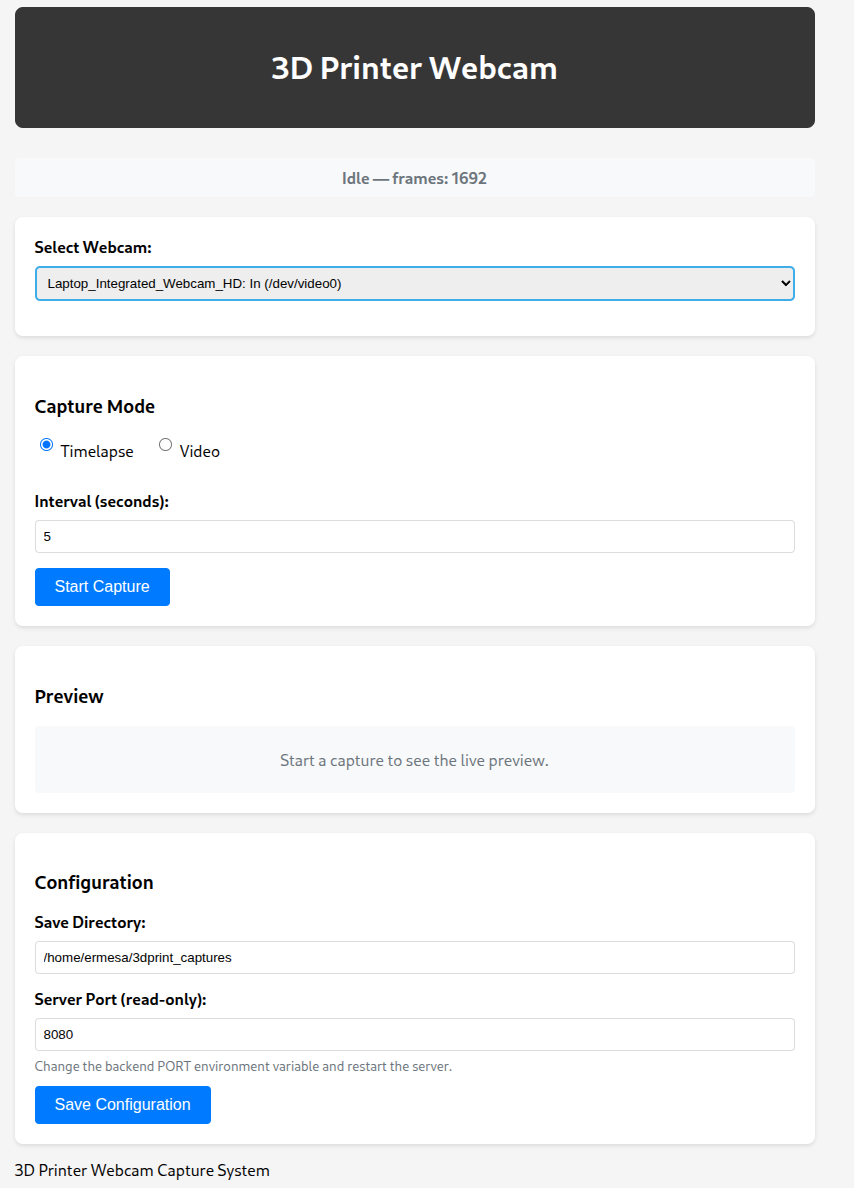
The AI-generated site for monitoring my 3D Printer
And here’s a video capture at about 4x speed. (The lighting isn’t awesome, but it gets the job done)
(Music used in the video: Erdfall by Kraftamt (c) copyright 2020 Licensed under a Creative Commons Attribution Noncommercial (3.0) license. http://dig.ccmixter.org/files/Karstenholymoly/61277 Ft: Platinum Butterfly)
So, how was my experience managing this AI-created project? Let me divide it into the positive and the negative.
Positive
- I now have the capability I needed. I would not have been able to code this myself in any reasonable amount of time and it would have probably gone onto my long list of “someday” or “win the lotto” projects
- Because I used a combination of my local LLM and free credits it cost me nothing
Negatives
- Because I had the LLM create something so far out of my depths, I was a slave to whether it could finish the task. Likewise, I am a slave to its capabilities if I want to change the project - whether to enhance or fix bugs.
- As someone who enjoys programming, I didn’t get to program. I was just a manager of a programmer - as I am at work
- As a programmer, I don’t enjoy not understanding how the code works.
- The agents don’t always listen to you - my local one ignored one of my key directives in the agents.md file to stick with vanilla Typescript.
In the end, as someone who knows how to code and enjoys coding, I don’t get any value or joy from AI-generated programming (which I guess is what vibe coding is?). If I didn’t know how to program, there would probably be something magical and amazing about being able to type and have the computer obey me - to make my will manifest. But as a coder, I can already do that. As I said before, this project has a very narrow scope. I just want to be able to see if the 3D Printer is messing up. While I’m doing that, I might as well get a video capture that I could potentially use in a video (but with better lighting, of course). So it doesn’t bother me that I won’t be able to do much (if any) modification to this code. But, at the time of this writing, I don’t see myself doing any AI-generated programming in the future.
Based on what I currently know about LLM Agentic programming from my limited experience, I’m most likely to use it on the edges of my code for things like finding bugs or, as I wrote about yesterday, as a personal Stack Overflow that I can use to remind myself how to use a Python or Go function that I rarely use. Or if I’m banging my head against the wall with something that won’t compile or is giving me weird errors, I might ask it to point me in the right direction. Programming solves problems for me, but I also enjoy it in the way people enjoy putting together jigsaw puzzles. Sure, an AI could do that immediately, but that’s not where the fun is found for that activity. As of right now, AI can’t replace that feeling of joy when I finish coding up a project and solve some small problem in my life.